Video Overview
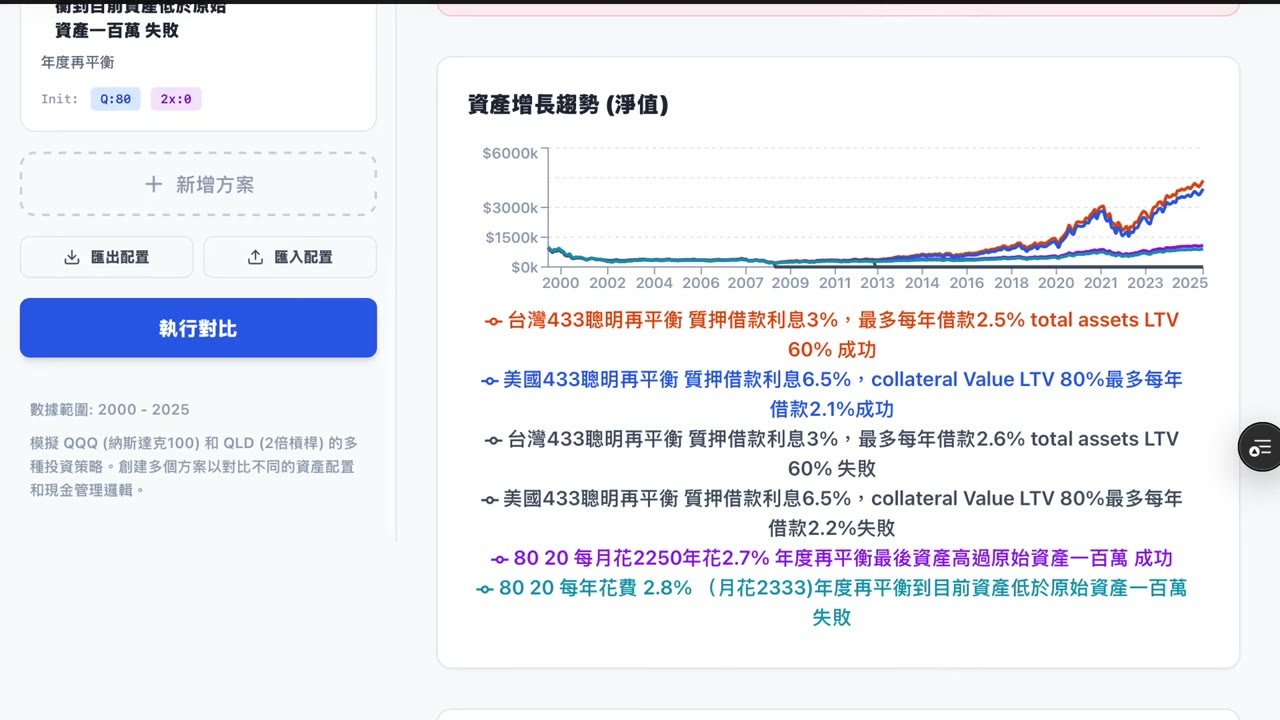
This video provides a hands-on walkthrough of the updated asset allocation backtesting tool. The presenter starts by creating a portfolio named “Taiwan 433 Smart Rebalancing,” entering sample parameters, duplicating an existing portfolio, and comparing runs with different settings. The middle portion switches between defensive and aggressive flexible-rebalancing configurations and demonstrates how Taiwan and U.S. allocation cases can be organized and exported. The closing section covers monthly cash flow, the household balance sheet, configuration changes, and whole-portfolio duplication, showing how users can trace a result back to its assumptions and data. Any successes, failures, or performance differences shown are outcomes of the presenter’s specific software examples, not general investment conclusions.
Key Takeaways
- The presenter restarts the asset allocation backtesting workflow in the updated interface by creating a “Taiwan 433 Smart Rebalancing” portfolio. The sample configuration includes 3% interest and annual borrowing capped at 2%; these figures are demonstration inputs only.
- An existing Portfolio can be duplicated and then adjusted for a side-by-side test. The video compares two settings labeled 2.5 and 2.6 and uses the 2.6 run as a failure case.
- The flexible-rebalancing example switches between defensive and aggressive settings. The presenter describes the aggressive configuration as performing better in this particular backtest, not as a guarantee of future strategy performance.
- The Taiwan and U.S. asset allocation cases can be renamed, duplicated, and exported, making it easier to preserve and compare variants without rebuilding every portfolio from scratch.
- The results area includes cash flow, monthly cash flow, and month-by-month household balance-sheet changes. Users can return to the configuration to revise assumptions and investigate where a calculation or outcome may have gone wrong.
Chapters
About 00:00:00 · Updated Tool and Taiwan Portfolio
The presenter introduces the updated interface, builds a Taiwan 433 Smart Rebalancing portfolio from scratch, and enters a name and sample borrowing-related parameters.
About 00:06:28 · Duplicating a Portfolio for Comparison
The Copy function duplicates the original allocation before settings labeled 2.5 and 2.6 are compared; one of the runs is used as a failure case in the demonstration.
About 00:13:42 · Flexible Rebalancing and Aggressive Settings
The walkthrough changes the flexible-rebalancing strategy type, reviews the aggressive case on screen, and then demonstrates how to export and download the backtest data.
About 00:20:56 · Defensive, Aggressive, and U.S. Cases
The presenter compares defensive settings with traditional smart rebalancing, adds an aggressive setup, and exports a U.S. case while organizing the Taiwan allocation file.
About 00:27:25 · Reviewing Cash Flow and the Balance Sheet
The final segment shows monthly cash flow, the household balance sheet, configuration editing, and whole-Portfolio duplication as tools for reviewing calculations and assumptions.
Related Topics
asset allocation backtesting tool, Taiwan 433 portfolio, smart rebalancing, flexible rebalancing, defensive and aggressive settings, Portfolio duplication, backtest result exports, cash flow and household balance sheets
This page was prepared with AI from selected portions of the video's audio to help readers understand the main topics. It may omit secondary material or contain transcription errors; the original video remains authoritative.